
Work software built around the project.
TradeLog Site organizes work the way trade and service companies actually run it: every invitation, time entry, event, note, photo, and report belongs to a specific project. That is what makes it possible to bring an outside trade onto one project without handing them the rest of your company.
Built for owner-operators, field crews, office admins, and Enterprise organizations with up to 50 assigned employee seats. No credit card required to start the trial.
Four things TradeLog Site does differently
Everything else in the product supports these four.
Project-specific access for outside workers
Invite outside trades to one project—not your entire company.
Project-connected clock in and clock out
Time is recorded against the project it belongs to, by deliberate user action.
Project and company scheduling
Project-connected events plus general company events the assigned team can see.
Built-in Fraction Calculator
Exact fraction math for signed-in users, right on the dashboard.
Two dashboards built for two different roles
TradeLog Site gives employees a focused place to manage their workday and gives authorized company leaders a broader view of time, staffing and Project activity.
Standard Dashboard — run the workday
The Standard Dashboard is the employee's operational workspace for recording accurate Project time and reaching the work they are assigned to.
- Select a Client or work type
- Select the applicable Project
- Confirm the Project number before clocking in
- Clock in and clock out
- Switch between On Site and Drive Time without ending the session
- View current-week and previous-week time
- Enter authorized manual time
- Open assigned Projects
- Reach everyday shortcuts
- Complete daily work without exposing company-wide HR information
Why it matters: Employees get a clear, focused workflow for recording accurate Project time without navigating through company-wide reporting tools.
HR Dashboard — see the whole company
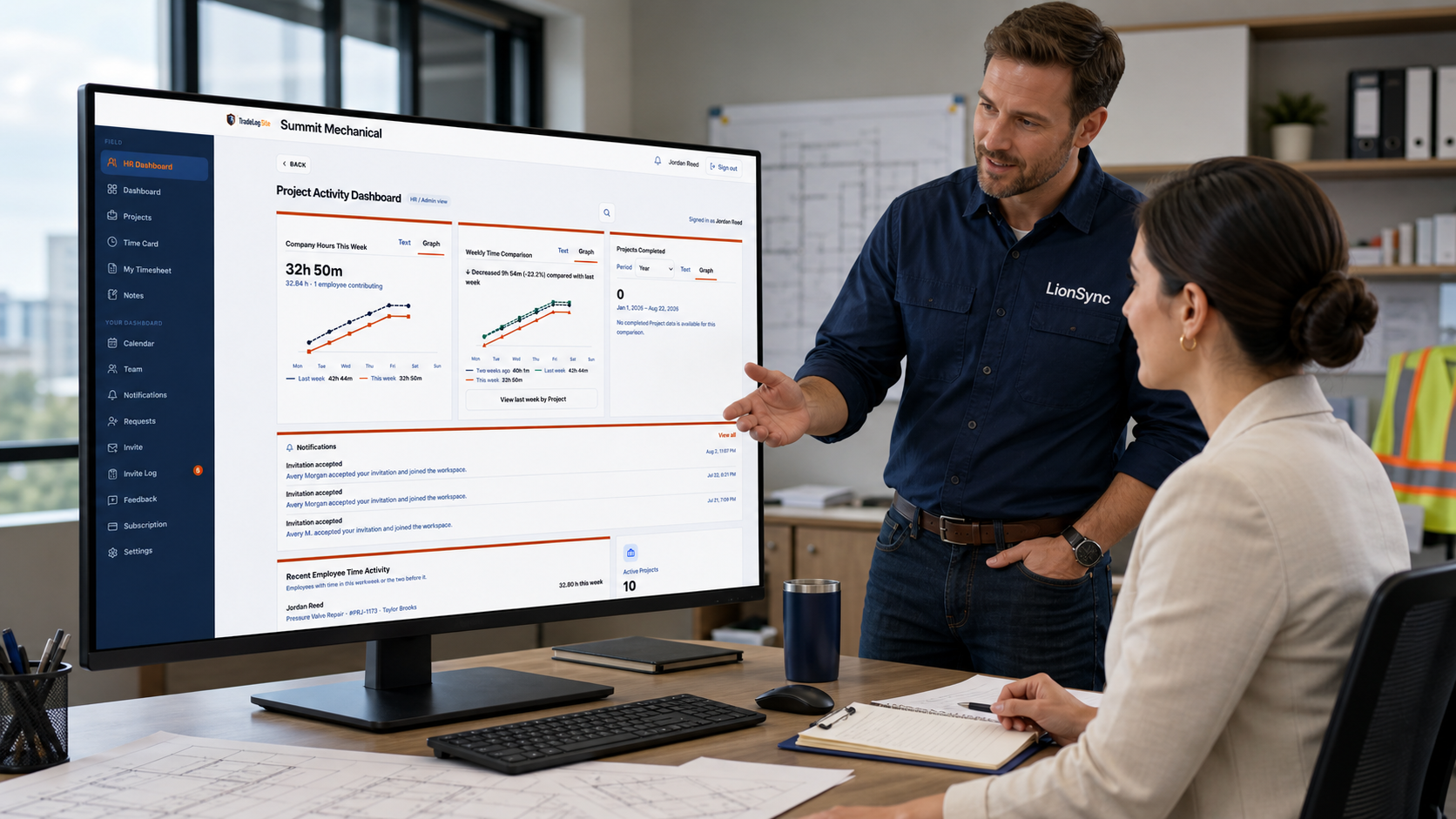
The HR Dashboard gives authorized company leaders a company-wide view of time and Project activity in one place.
- Company Hours This Week
- Weekly Time Comparison
- Projects Completed
- Notifications
- Recent Employee Time Activity
- Employee search and filtering
- Project-number search
- Employee weekly-time drill-down
- Existing HR Quick Actions
Why it matters: Owners, Admins and HR staff can understand labor usage, staffing needs and Project-delivery movement without opening every employee, timesheet or Project separately.
Field activity becomes useful company insight
Employees record their work through the Standard Dashboard. The HR Dashboard organizes that authorized company activity into weekly comparisons, completion trends and recent employee time activity. The same underlying work is presented differently for the people doing the work and the people responsible for planning it.
- Less manual spreadsheet consolidation
- Faster visibility into changing labor demand
- Easier staffing and scheduling decisions
- A clearer understanding of which Projects receive employee time
- Earlier awareness when current-week hours differ from previous workweeks
- Longer-term visibility into completed-Project volume
- A central place for authorized leaders to review recent employee activity
See where your team’s time is going
The HR Dashboard gives owners and authorized team leaders a company-wide view of time activity without opening every employee or Project individually.
Company Hours This Week
Cumulative company hours across the current workweek, compared with the previous workweek, so current labor usage is visible while the week is still in progress.
- Cumulative company hours across the current workweek
- Comparison with the previous workweek
- Whether this week is tracking above or below last week
- Staffing or workload changes while the week remains in progress
Why it matters: Leaders can recognize changing labor demand while there is still time to adjust the current week.
Weekly Time Comparison
This week, last week, and two weeks prior, all aligned to the company's configured workweek start.
- This week, last week, and two weeks prior
- All periods aligned to the company's configured workweek start
- Multi-week context rather than one isolated total
- Supports scheduling and workload planning
Why it matters: Comparing three aligned workweeks makes developing labor trends easier to recognize and explain.
Projects Completed
The current year compared with the previous year, or the current six-month period compared with the preceding six months.
- Current year compared with the previous year
- Current six-month period compared with the preceding six months
- Project-delivery volume over time
- Longer-term operating context alongside labor hours
Why it matters: Owners can see whether completed-Project volume is changing over a meaningful business period.
Display controls and drill-down
- Each chart can be viewed as Text or Graph
- The three display choices are saved independently for each signed-in authorized user
- The completed-Project comparison can be switched between Year and Six Months
- Employee search and filtering connects company-hour totals to an individual employee's recent time activity
- Recent Employee Time Activity shows the latest employees who recorded time, their most recent Project, and their current-week total
- An employee drill-down opens the current workweek, the two prior workweeks, and the Projects receiving that time
These charts are built for labor visibility, staffing decisions, workload planning, and Project-delivery context. They are not employee performance scores, productivity rankings, payroll calculations, predictive analytics, or automated disciplinary tools. HR Dashboard visibility is limited to authorized company roles: employees holding the HR role, plus owners and administrators whose company has the HR Dashboard available.
Project-specific access for outside workers
Invite outside trades to one project—not your entire company. An invited collaborator reaches the project they were invited to and nothing else, so unrelated projects, customers, and company records stay out of view. Outside collaborators receive controlled access to the assigned project—not continuous monitoring and not access to the rest of the company.
- Access is granted per project, so unrelated projects remain inaccessible
- Permission levels are adjustable: view only, limited, standard, elevated, and admin
- Individual permissions cover viewing the project, notes, tasks, events, submitting time, viewing time, and managing the project team
- View only means exactly that — every write permission is off
- Broader project permissions are still project permissions, not company access
- Outside collaborators do not consume employee seats
- Access can be ended or removed at any time without deleting the project record
- Work an outside collaborator submits stays attributed to their account in the project history
Bring in the electrician, the inspector, or the GC for the work they are actually part of — and end that access when the project is done.
How a project-specific invitation works
- Step 1Outside worker
An electrician, inspector, or GC who is not an employee of your company.
- Step 2One particular project
The invitation names a single project. Unrelated projects remain inaccessible.
- Step 3Permission level
You choose the permission level for that project, from view only through elevated.
- Step 4Project-only access
They reach that project and nothing else. Access can be removed at any time.
No employee seat is consumed by an outside worker. Unrelated projects remain inaccessible, access can be removed at any time, and broader project access is still not company-wide access.
Project-connected clock in and clock out
Clocking in and clocking out are deliberate user actions. Project selection helps connect time to the correct work; it is not based on GPS, geofencing, or automatic arrival detection.
- Choose an active project when clocking in, so hours land on the right work
- The dashboard shows whether you are currently clocked in and which project you are on
- Current week and previous week totals are shown for your own time
- New project activity is limited to active projects, in the app and in the database
- No active projects yet? Clock general work manually and keep the record accurate
Hours arrive already attached to a project, so review and billing questions have an answer without reconstructing the week from memory.
Project and company scheduling
Put inspections, deliveries, and scheduled work on the calendar where the people doing the work can see it. Events can be connected to a specific project, or kept as general company events that are not tied to one project.
- Project-connected events appear with the project they belong to
- General company events cover scheduling that is not project specific
- Who can see and edit an event follows the same project permissions as the rest of the project
- Field and office work from the same schedule instead of a group text
One schedule the crew, the office, and invited trades all read the same way.
Built-in Fraction Calculator
Signed-in users open the Fraction Calculator from the dashboard and work in the measurements the trades actually use. It is included with TradeLog Site and available to signed-in users.
- Whole numbers, fractions, mixed numbers, and decimals
- Add, subtract, multiply, divide, and continue from the previous result
- Exact fraction math, not rounded decimal approximations
- Results show a reduced fraction or mixed number with the decimal underneath
- Usable from the signed-in dashboard on a phone
- Calculations are temporary — nothing is stored to the project
Cut lists and takeoffs add up correctly the first time, without switching to a separate calculator app.
Track open items until they are closed
A punch list lives inside the project. Anyone with access to the project can see what still needs closing, and the right people can add, assign, and complete items as the work moves forward.
- Create actionable Project tasks and punch-list items
- Each item carries a description, due date, priority, and area or location
- Assign an item to a team member and add notes for context
- Outstanding work stays attached to the correct Project
- Review open work from the Project workspace
- Track status and completion, including who completed it and when
- A verification field records that the work was checked
- Attach photos so the condition is visible, not just described
- Update items only when your Project permissions allow it
- Punch-list write actions become unavailable once the project is no longer operationally active
The punch list is the open-items list—what still needs doing. The daily report, below, is what happened that day.
A field-written record for each day and project
A daily report is a per-day, per-project record of the work performed, written by the person on the project. The project team can read it, and the team is notified when a daily record is added.
- Record the work performed for the day, attached to the correct Project
- Report history stays with the Project record
- Optionally capture weather, materials, issues, and other field notes
- Submit reports for review where the current permission model allows it
- Authorized office staff have one place to review recent reports
- The project team is notified when a daily report is added
- Daily reports are distinct from weekly reports, which carry an admin review workflow
Each day's record stays with the project it belongs to, so the office and the next shift read the same account of what happened.
Give employees the authority their role requires
Internal employees use company roles, while Project-specific permissions control operational access where required. Owners can assign responsibility without giving every employee the same level of control. Company-wide authority comes from the role; day-to-day operational access on a particular Project comes from that Project’s permissions, and an ordinary employee receives only the access they are assigned. Subscription and seat eligibility are separate from permission authority. TradeLog Site stores one manager role, labeled Project Management in the product and Manager / PM here.
Owner
- Company-wide projects
- Every project
- Create projects
- Yes
- Team management
- Any role up to Admin
- Time & report visibility
- All
- Billing & settings
- Yes
Cannot be demoted or removed.
Admin
- Company-wide projects
- Every project
- Create projects
- Yes
- Team management
- Up to Admin (cannot assign Admin)
- Time & report visibility
- All
- Billing & settings
- Yes
HR
- Company-wide projects
- Every project
- Create projects
- Yes
- Team management
- No
- Time & report visibility
- All (HR Dashboard)
- Billing & settings
- No
Manager / PM
- Company-wide projects
- Every project
- Create projects
- Yes
- Team management
- Employees only
- Time & report visibility
- All
- Billing & settings
- No
One manager role is stored.
Employee
- Company-wide projects
- Assigned projects only
- Create projects
- No
- Team management
- No
- Time & report visibility
- Own time on assigned projects
- Billing & settings
- No
The owner cannot be demoted or removed. An admin can assign any role up to admin but cannot assign another admin. HR can create projects and see every project in the company but has no billing or company settings. A manager can create and edit projects and manage employees but has no billing or HR Dashboard access. An employee reaches only assigned projects.
Two access systems
Internal employees—owner, admin, HR, manager, and employee—hold a company role that sets their reach across the company. Outside workers are different: they are invited to a single project with a chosen permission level, have no company-wide reach, and do not consume an employee seat.
Outside collaborators remain separate from internal employees and receive only the Project access deliberately granted to them. No employee seat is consumed by an outside worker, unrelated projects remain inaccessible, access can be removed at any time, and broader project access is still not company-wide access.
Keep company conversations connected
Enterprise teams can privately message an employee, communicate with the internal crew assigned to a Project, or send a company-wide announcement without moving the conversation outside TradeLog Site.
Private message
- Reaches one active internal employee
- Only the sender and the recipient can open the conversation
- Choose a specific active employee from the company directory
Project message
- Reaches the active internal employees connected to the selected Project
- Keeps operational discussion with the Project team it belongs to
- Outside collaborators are not included
Company announcement
- Reaches active internal employees across the company
- Intended for company-wide communication from authorized leaders
Authority and privacy
- Owner, Admin, HR and Manager / PM can start a conversation
- Employees can reply to conversations they receive
- Only the intended participants can read a conversation
- A notification tells you a message arrived without showing the message body
- Desktop and tablet use the floating messenger; mobile uses the Messages screen
Messaging is available through Enterprise entitlement. It is not unlocked by purchasing additional employee seats on another plan.
Built to coordinate work—not monitor people.
TradeLog Site gives companies a clearer record of their projects without requiring continuous worker surveillance. Employees and outside collaborators use deliberate actions to clock time, review schedules, add notes, submit reports, and update the work they are authorized to access.
No background location tracking
TradeLog Site does not use background GPS or geofencing to follow workers, detect when they arrive, or monitor where they travel during the day.
No automatic location-based punches
Workers remain in control of clocking in and clocking out. TradeLog Site does not automatically create or end a time entry because a phone entered or left a geographic area.
Project records instead of activity surveillance
The product records the work information users intentionally submit—such as time entries, notes, events, reports, photos, documents, tasks, and project updates. It is not designed to capture screens, log keystrokes, monitor browsing activity, or create a continuous record of someone’s movements.
Access controls protect both the company and the worker
Employees receive access appropriate to their company role. Outside workers receive access to the particular projects they are invited to and only the project permissions they have been granted. Controlled access keeps collaboration focused without exposing unrelated company work.
Accountability without unnecessary surveillance.
TradeLog Site helps answer practical project questions—who recorded time, what was added to the project, what is scheduled, and what still needs attention—without turning a worker’s phone into a continuous location tracker.
Every Project, organized and easy to find
Search and filter the Projects you are authorized to see, then open the complete workspace for the Client, schedule, crew and field activity.
Search and status filtering
- Project numbers and Client names identify each Project at a glance
- Status, location and schedule appear on the Project card
- Search by Client and filter by status without leaving the page
- Active, Ready to Bill, Completed and Archived keep the list organized
- You only see the Projects your company role and Project permissions allow
Everything else that keeps a Project together
Project records and history
One record per project holds the crew, customer details, schedule, and everything added along the way.
Project notes
Field updates stay attached to the project, so the office and the next shift are not guessing.
Photos and documents
Progress photos and PDFs upload from the phone and stay with the project.
Punch lists and tasks
Open items tracked to completion inside each project. See the punch list section above.
Daily and weekly reports
Daily field records plus a weekly admin review. See the daily reports section above.
Project status workflow
Move projects through active, paused, ready to bill, completed, cancelled, and archived.
Team and employee access
Add employees with a company role and control which projects each person can reach.
Dashboard visibility
Company-wide hours and activity for owners, admins, and HR. See the HR Dashboard section above.
Field work stays connected to the Project
Tasks, notes, schedules, files, crew information and reports remain together in the Project workspace instead of being scattered across separate tools.
Who TradeLog Site helps
TradeLog Site supports owner-operators through Enterprise organizations. Individual covers a single paid seat, Small Business covers a growing crew, and Enterprise includes 50 employee seats, with additional internal seats available at any time.
- Owner-operators running their own projects
- Small trade and service crews
- Growing companies adding employees and managers
- Enterprise organizations with larger employee-seat capacity
Start your 14-day free trial
Set up your company and your first project today. No credit card required.